
Whether it’s a Facebook ads or search campaign, budget is one of the main concerns when it comes to running online advertising campaigns. Small business owners, digital marketers, marketing managers – we all want to make sure that our money is being well spent.
However, successful, high-performance Facebook ads depend on a few factors. While it is essential to start with proper segmentation, good targeting, and relevant content, how you set up the campaign will also impact results.
Here are 4 settings that will help you spend your ad campaign budget a bit more efficiently.
Why use Facebook Ads
Even if it has a bad reputation for skewing some metrics and messing with data, Facebook is a very important channel for any business.
Why is that?
First of all, Facebook has over 1.49 billion active users as of September 2018 and over 2 billion monthly users. Active users spend, on average, at least 35 minutes per day on the platform. This accounts for 19% of the time spent on smartphone and tables. (source)
What’s more, Facebook and Messenger are in the top 5 apps for download. (source). To top everything, 57% of consumers say that social media will influence their purchasing decision.
Considering those numbers, it’s hard to dismiss Facebook as a channel for getting in front of an audience.
The catch is that organic reach for any Facebook page is somewhere around 6-7% of their total page likes. This means that in order to get seen, businesses need to step up and advertise on the platform.
Before we dive in
As they run from the same ad campaign manager, the tips below apply both to Facebook and Instagram ad campaigns.
By default, any ad campaign you create runs both on Facebook and on Instagram. From my point of view, it would be better to separate those – especially if you have large ad campaign budgets. I’ve covered the reasons why here.
Also, each campaign and each business is unique. This means that a placement that works for one business might not perform as well for another. It is essential to test and find what works best for your own business and field.
And now…
4 Facebook ads tips for smarter ad campaign spend
1. Use ad scheduling
The standard Facebook ad campaign will run at all hours of day and night. While this might be great for testing, it might not be the best idea in the long run. That’s because running your ad at all times includes showing it at odd hours when purchasing is slow by default – such as nighttime.
This is where ad scheduling comes in. It’s a great feature that helps you avoid wasting your ad campaign budget. Ad scheduling allows you to specify what times of day (or night) you want your ads to be shown.
There is only one caveat though. Ad scheduling is not available for campaigns that run with a daily budget.
To use ad scheduling, you first need to set a start date and an end date for your campaign, along with a lifetime budget. Once you’ve set those, click the ‘Run ads on a schedule’ radio button and you will get this cool table below. Just drag to select the times when you want to have your ads shown and you’re done.
A word of caution here. You should consider your customers’ purchasing behaviors and business specifics. If you know that your customers happen to buy late at night, then you should focus your ad campaign budget for that time slot. Also, if you know that business picks up on weekends, you should consider focusing your budget on Saturday and Sunday.
Overall, Facebook ads scheduling is a great feature that allows you to spend your budget a bit more wisely.
2. Set up different campaigns for mobile and desktop
By default, your Facebook ads will run both on mobile and on desktop.
Since Facebook gets a lot of mobile traffic (see above), it’s somewhat natural that you will get a lot more impressions on mobile than on desktop. While this is not a problem in and of itself, it will become one when the larger part of your ad campaign budget goes to mobile without generating a positive return on investment.
As an advertiser, you don’t get to control how much of your ad campaign budget is spent on mobile and how much on desktop.
Given its high volume, mobile is great for exposure at low impression and click cost. However, desktop still converts better than smartphones – about 3 times better. (source)
If you’re aiming for conversions, it’s essential to set up different ad campaigns. This will allow you to spend on clicks that generate conversions instead of just getting cheap ad impressions.
To get an idea of how much costs can vary, run a small test campaign targeting both mobile and desktop. This will show you how successful you are with each device. Next, take the findings and set up two different ad campaigns, with budgets adjusted accordingly.
To target only one device in your Facebook ads campaign, go to the Placements section. Here, turn off automatic placements and select the appropriate device from the dropdown.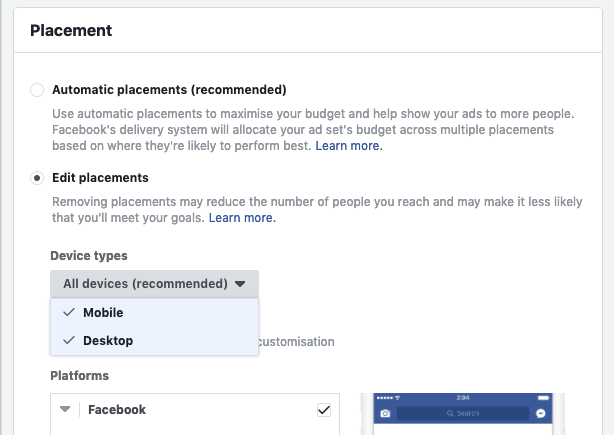
3. Edit ad placements
Unless you edit the Placements section, your Facebook ads campaign will run across all placements and both networks. This includes Messenger, Instant articles, right-hand side ads, and the Audience Network.
However, you don’t get any control over how much of your ad campaign budget is spent on each placement.
This might be good if you’re running a test campaign to see how well different placements covert. However, if you know one placement performs better than the other, you should considering focusing your budget over there.
To do this, just switch from all placements when you’re setting up your Facebook ads campaign. Click only the placements you want to include.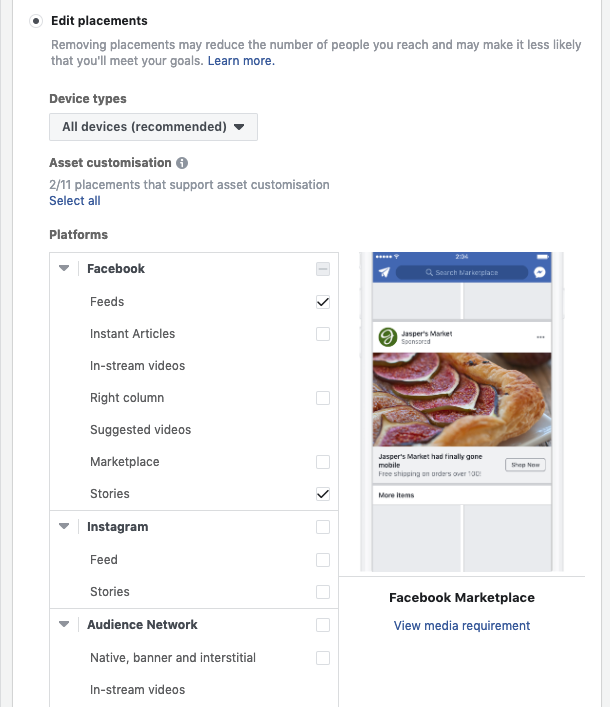
Targeting specific placements might mean extra work, especially for small budget campaigns. But if you want to spend your ad campaign budget wisely, it is definitely worth considering.
4. Set an automated rule that checks for frequency
Generally, you don’t want to spend too much of your budget showing the same ad over and over again to people. Doing so might annoy your audience, who could feel bombarded with ads from one specific advertiser.
However, unless you select reach as a Facebook ads campaign objective, Facebook doesn’t provide you with any direct control on how often people see your ad. And consequently, with no control over how your ad campaign budget is being spent.
While you can manually monitor your ad campaign frequency, there is a simpler solution. All you need to do is to set up an automated rule that checks for frequency. Here are the steps.
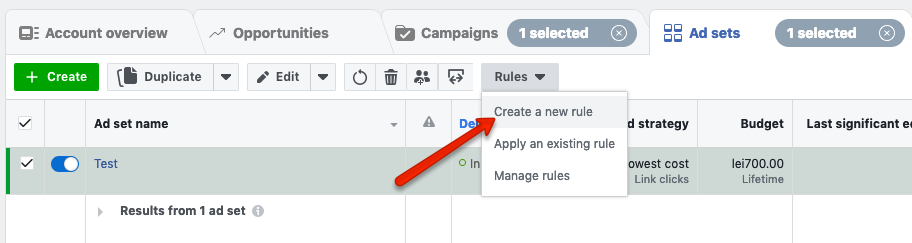
Go to your Facebook ads campaigns manager. Select the campaign or the ad set you want to apply the rule to.
- Click the ‘Rules’ button and select ‘Create a new rule’ from the dropdown.
- Select the Action you want. You can choose between having the ad campaign or the ad set paused or getting a notification.
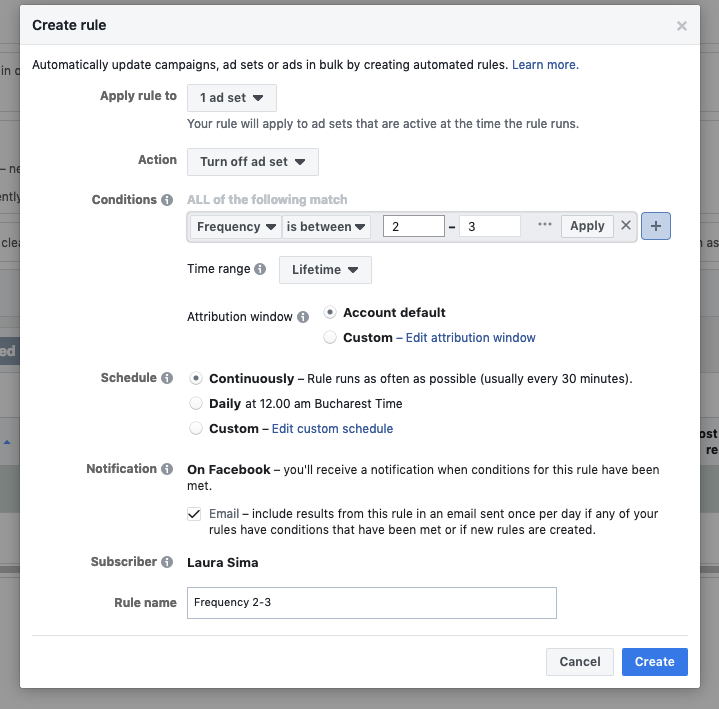
- Next, go to Conditions. Look for Frequency and decide the threshold. You can choose frequency higher than or between specific intervals. Generally, you can go with a frequency higher than 2 or between 2 and 3. For more tips on what makes a good frequency for your campaign, check out this resource.
- Select how often you want the rule to run. You can choose between continuously, daily or on a custom schedule
- Next, select who will be notified and how.
- Name your rule and click ‘Create’ to save.
Back over to you
What do you think of these settings?
What other tactics or strategies do you use to make sure you’re spending your Facebook ads campaign budget wisely?